CYBER.CO.KE is an independent Cyber Services website and is not affiliated with any government agency, including Kenya Revenue Authority (KRA). A service fee is charged for the assistance provided to customers in Kenya.
If you are Student in Kenya with an active KRA PIN Number, you are required to file your KRA Returns on or before the elapse of the 30th June deadline as set out by Kenya Revenue Authority (KRA). Students normally file KRA Nil Returns on iTax (KRA Portal) as they don’t have any source of income. Failure to file KRA Returns for Students normally atrracts a penalty of Kshs. 2,000 per year not file (late filing).
As a student, you can avoid the KRA Penalties by ensuring that you file your KRA Returns as early as possible and you don’t need to wait till the last minute to file your KRA Returns. To be able to file KRA Returns for Students, you need to ensure that you have with you both the KRA PIN Number and KRA Password (iTax Password) which you will need to use to access your account and file KRA Returns.
If you don’t know your KRA Password (iTax Password), you can easily reset it or you can also request for KRA PIN Change of Email Address so as to be able to easily reset the password and be able to file KRA Returns for Students online easily. In this blog post, I will be sharing with you the main steps that you need to follow on How To File KRA Returns for Students on iTax (KRA Portal).
READ ALSO: Step-by-Step Process of Filing KRA Returns: KRA Nil Returns
How To File KRA Returns for Students
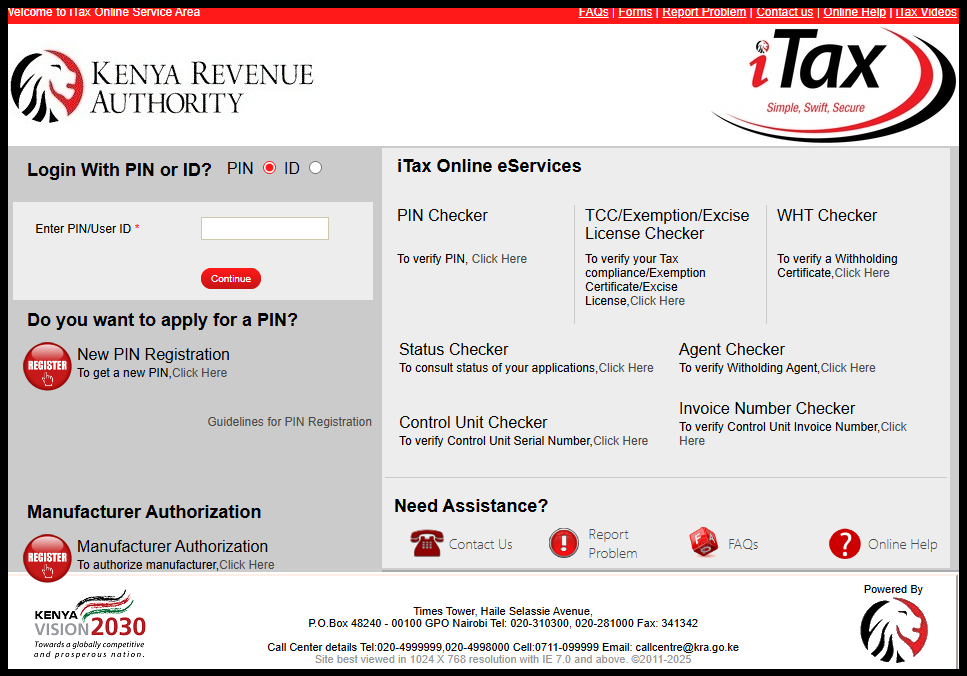
Step 1: Visit iTax (KRA Portal)

To be able to file KRA Returns for Students, you first need to visit iTax (KRA Portal) by using https://itax.kra.go.ke/KRA-Portal/
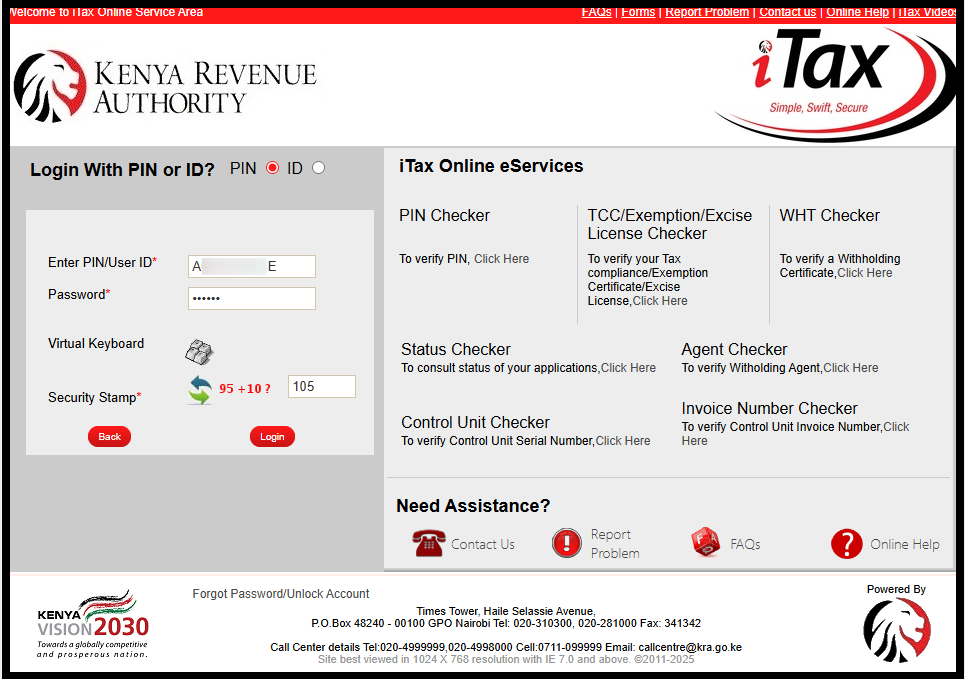
Step 2: Login Into iTax (KRA Portal)

In this step, you need to login into iTax (KRA Portal) account by entering your KRA PIN Number, KRA Password (iTax Password), solve the arithmetic question (security stamp) and then click on the “Login” button to access your account so as to begin the process of filing KRA Returns for Students.
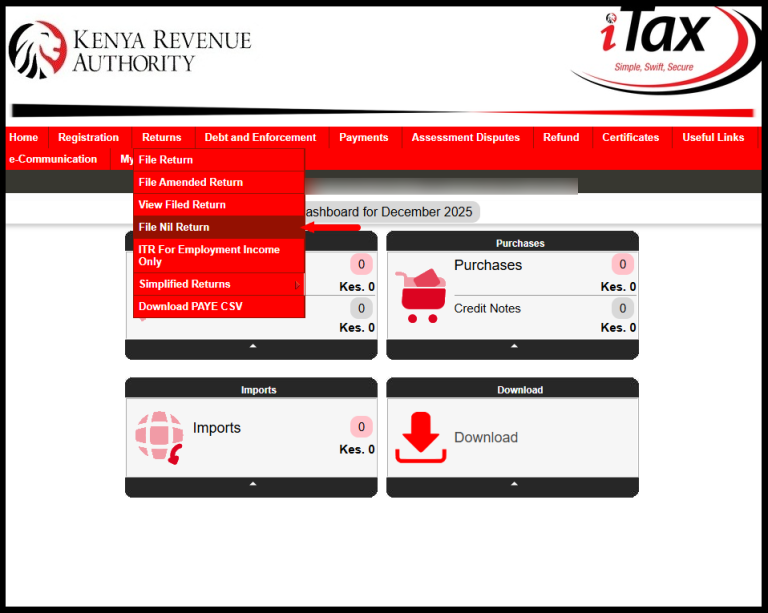
Step 3: Click on Returns then File Nil Return

Next, after you have successfully logged into your iTax (KRA Portal) account, click on “Returns” menu then click on “File Nil Return” from the drop down menu list to begin the process of filing your KRA Nil Returns on iTax (KRA Portal).
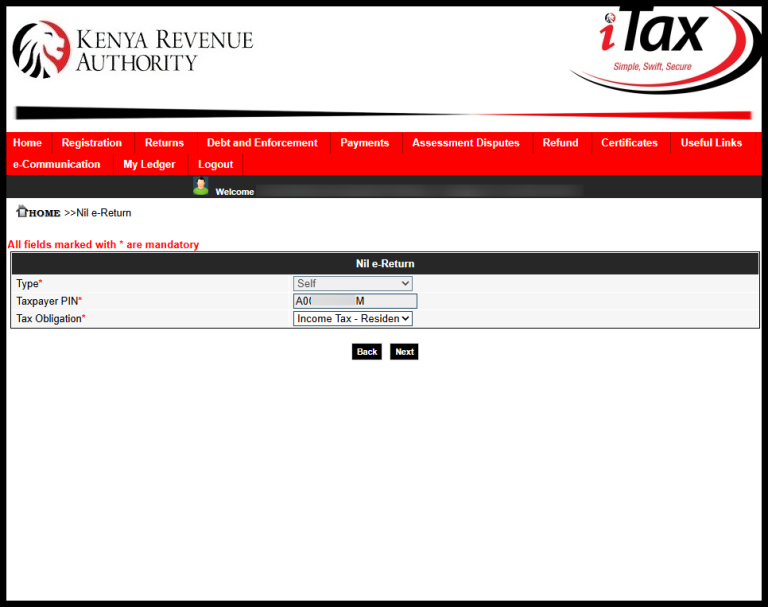
Step 4: Select Tax Obligation

Selection of Tax Obligation is the next step where you have to select the KRA Tax Obligation that you want to file KRA Returns for Students under. Here, you need you need to select “Income Tax – Resident Individual” as the Tax Obligation then click on the “Next” button.
Step 5: Fill In The Income Tax Resident Individual Nil e-Return Form

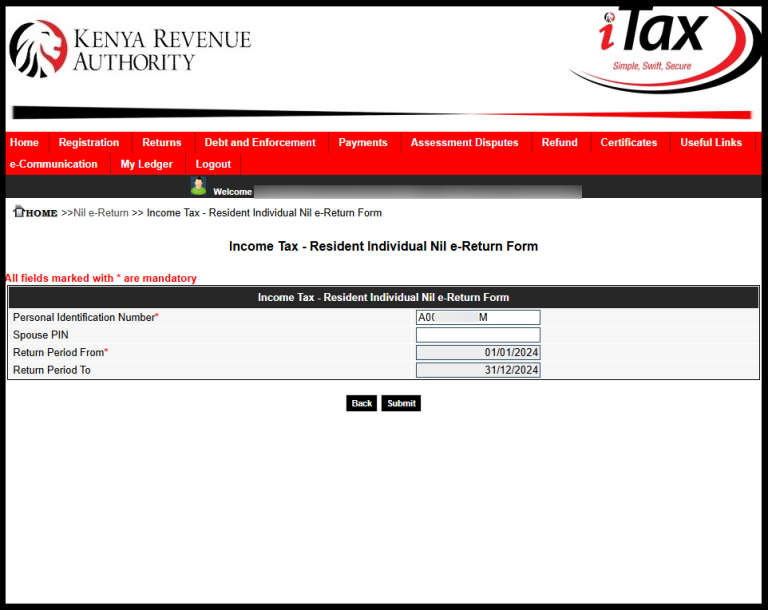
In this step, you need to fill in the Income Tax Resident Individual Nil e-Return Form. On this KRA Nil e-Return Form, you are supposed to fill in is the “Return Period From” which will auto-fill the “Return Period To.” As an example, if you are filing KRA Returns for Students for the year 2023, the Return Period From will be 01/01/2023 and the Return Period To will be 31/12/2023. Once you have filled in the KRA Nil e-Return Form, click on the “Submit” button.
Step 6: Download e-Return Acknowledgement Receipt

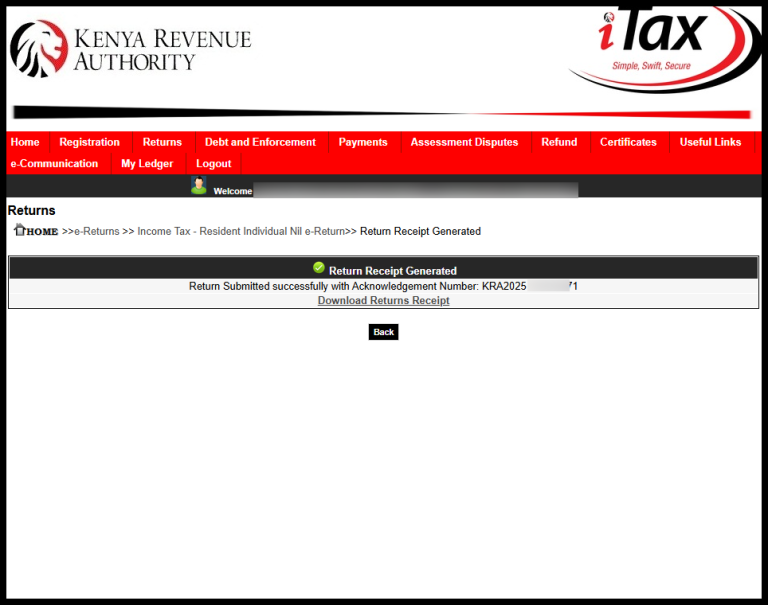
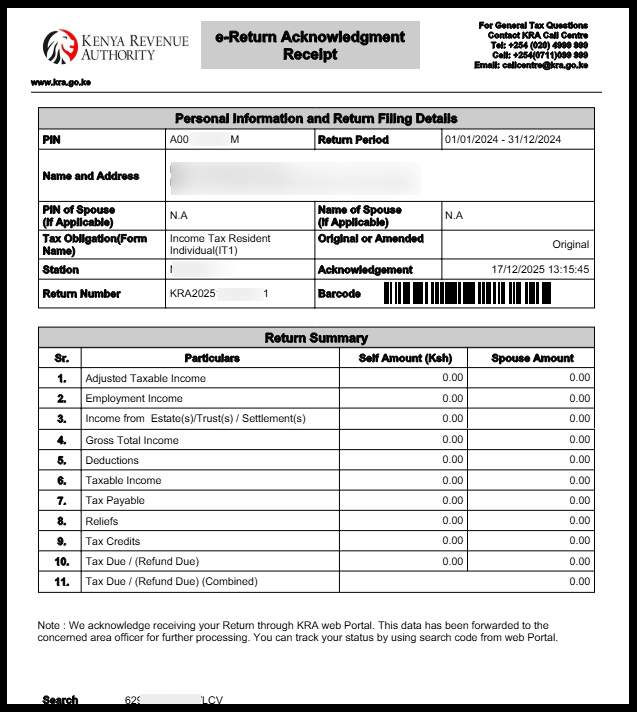
In this last step, all you need to do is download the KRA e-Return Acknowledgement Receipt that has been generated by iTax (KRA Portal) after the submission of your KRA Returns for Students. To download the KRA Returns Receipt, click on the link that is titled “Download Returns Receipt” to download and save the e-Return Acknowledgement Receipt.
READ ALSO: Step-by-Step Process of Downloading KRA Payment Slip
Filing of KRA Returns for Students on iTax (KRA Portal) is quite simple but you need to note some important things. Students who don’t have any source of income are required to file KRA Nil Returns on iTax. Also, you need to ensure that you have with you both your KRA PIN Number and KRA Password (iTax Password) which are required in the process of logging into iTax (KRA Portal) account. Once you have with all these, you can follow the outlined 6 steps so as to successfully file KRA Returns for Students online using iTax (KRA Portal) before the elapse of the 30th June KRA Returns deadline.

Matthews Ohotto is a Writer at CYBER.CO.KE where he specializes in writing helpful and informative Step-by-Step Tutorials that empower Kenyans with practical skills and knowledge. He holds a Bachelor’s Degree in Business Information Technology (BBIT) from Jomo Kenyatta University of Agriculture and Technology (JKUAT). Get KRA Individual Services and KRA Returns Services in Kenya.
ADVERTISEMENT
Check Out Our Popular Blog Posts
ADVERTISEMENT
Check Out Our KRA Individual Services
Register KRA PIN Number
Submit Service Request →Retrieve KRA PIN Certificate
Submit Service Request →Update KRA PIN Number
Submit Service Request →Change KRA PIN Email Address
Submit Service Request →Check Out Our KRA Returns Services
File KRA Nil Returns
Submit Service Request →File KRA Employment Returns
Submit Service Request →File KRA Amended Returns
Submit Service Request →File KRA Withholding Tax Returns
Submit Service Request →ADVERTISEMENT
Check Out Our KRA Tax Calculators
Calculate Turnover Tax (TOT)
TOT Calculator →Calculate Monthly Rental Income (MRI)
MRI Calculator →Calculate Value Added Tax (VAT)
VAT Calculator →Calculate Pay As You Earn (PAYE)
PAYE Calculator →CYBER.CO.KE
Get KRA Services Online Today
CYBER.CO.KE is a trusted online cyber services website dedicated to providing KRA Individual Services and KRA Returns Services to customers in Kenya on a day to day basis.
The KRA Individual Services that we offer to customers includes: Registration of KRA PIN Number, Retrieval of KRA PIN Certificate, Updating of KRA PIN Number and Changing of KRA PIN Email Address.
The KRA Returns Services that we offer to customers includes: Filing of KRA Nil Returns, Filing of KRA Employment Returns, Filing of KRA Amended Returns and Filing of KRA Withholding Tax Returns.
If you are looking for dependable, fast and reliable KRA Services in Kenya, we are ready and available to support you at every step of the way.
We prioritize customer convenience, clear communication and prompt service delivery, making sure that your submitted service request is completed in the shortest time possible.
ADVERTISEMENT