CYBER.CO.KE is an independent Cyber Services website and is not affiliated with any government agency, including Kenya Revenue Authority (KRA). A service fee is charged for the assistance provided to customers in Kenya.
Are you looking to Download your Tax Compliance Certificate on KRA Portal? Learn and get to know the steps on How To Download Tax Compliance Certificate.
The most important thing after filing your KRA Returns is normally to apply for Tax Compliance Certificate which is a final document showing that you have complied with the Tax Laws, declared and filed all KRA Returns plus made payments to Kenya Revenue Authority (KRA) if you had any tax liabilities.
But the main issue normally arises when one needs his or her Tax Compliance Certificate but is not aware or does not know the steps that should be taken in order to download the Tax Compliance Certificate using KRA Portal. This is a challenge to many taxpayers in Kenya who are in need of this important and vital documents that is issued by Kenya Revenue Authority (KRA).
READ ALSO: KRA PIN Reprint Steps To Follow Using KRA iTax Portal
Learning and knowing the process of downloading Tax Compliance Certificate using KRA Portal is important for any taxpayer in Kenya who has a KRA PIN Number and whether employed or unemployed. This is because the TCC or simply Tax Compliance Certificate is a very crucial and in demand document that is issued for compliant taxpayers.
In this article, I will be sharing with you the steps that you need to follow in order to download your Tax Compliance Certificate on KRA Portal with much ease and convenience. I will not dwell much with the definitions of terms as our main focus will be on the steps or process that one needs to follow so as to be able to get his or her TCC on KRA Portal.
Downloading Tax Compliance Certificate on KRA Portal is much easier if you know the process, steps and procedure that you are supposed to follow. But above all that, you need to ensure that you have with you the KRA Portal login credentials that comprises of the KRA PIN Number and KRA Password. Once you have the two credentials with you, then you can easily follow the step by step procedure that is outlined in this article on How To Download Tax Compliance Certificate.
Requirements Needed To Download Tax Compliance Certificate

To be able to download your Tax Compliance Certificate on KRA Portal, there are a set of requirements that you need to ensure that you have with you. This includes; KRA PIN Number and KRA Password. These two play an important role as you will need them in order to login to KRA Portal so as to be able to download Tax Compliance Certificate.
Just as I have mentioned above, to be able to download TCC or Tax Compliance Certificate using KRA Portal, you are going to need your KRA PIN Number and KRA Password as these two form the most important KRA Portal login credentials. Let’s look at each of these key requirements briefly below.
-
KRA PIN Number
KRA PIN Number is the most important requirement that you need to have with you. If by any chance you have forgotten or you don’t remember your KRA PIN, you can submit KRA PIN Retrieval order online here at Cyber.co.ke Portal and our team of experts will be able to assist with with PIN Retrieval request.
At the same time, if you are looking for a new KRA PIN, you can get it here in 3 minutes by submitting your KRA PIN Registration order today at Cyber.co.ke Portal. Your KRA PIN Certificate will be sent to your Email Address once the Request for PIN Registration has been done and processed from our Support team.
-
KRA Password
The next requirement that you need to have with you is your KRA Password. You will need the KRA Password to access your KRA Portal Account. If you don’t know or have forgotten your KRA Password, you can check our article on How To Reset KRA Password. Once you have requested for password reset, a new password will be emailed to you and you can use it to log into your KRA Portal Account.
You can only change or reset your KRA Password if the email used in KRA iTax Portal is the same as the one you currently have. If you don’t remember or need to change your KRA Email Address, you can submit KRA PIN Change of Email Address order online at Cyber.co.ke Portal and have your Email Address changed so as to enable you Reset KRA Password.
How To Download Tax Compliance Certificate
Step 1: Visit KRA Portal
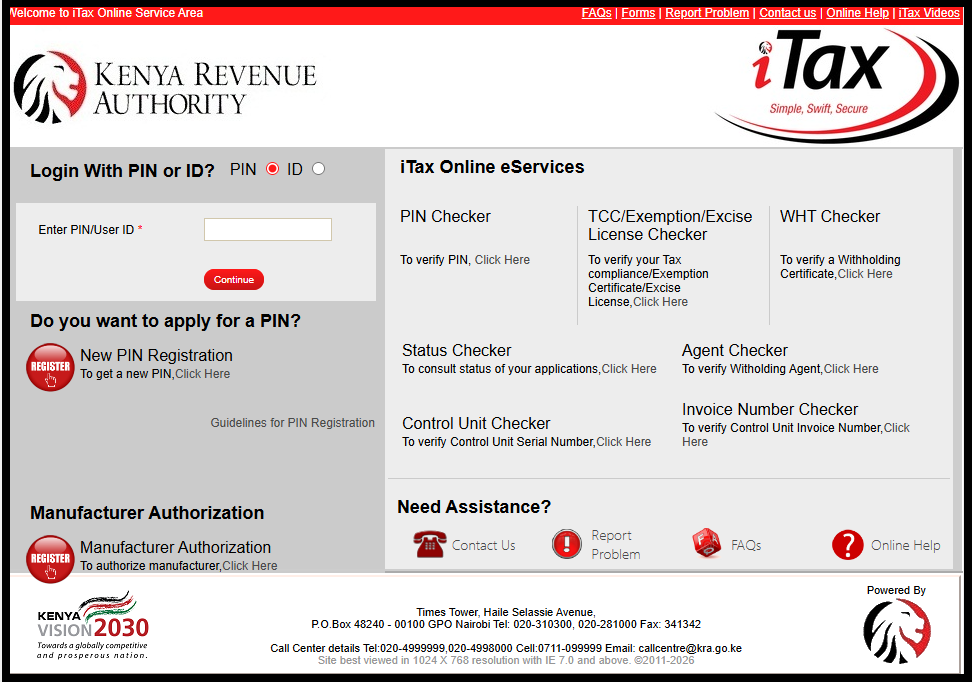
The first step in the process of How To Download Tax Compliance Certificate that you need to take is to ensure visit the KRA Portal. You can click on https://itax.kra.go.ke that will take you to the KRA Portal. Note that the link will open in a new browser tab.

Step 2: Enter KRA PIN Number
In this step, you will need to enter your KRA PIN Number. If you have forgotten your KRA PIN, you can request for KRA PIN Retrieval here at Cyber.co.ke Portal and your KRA PIN will be sent to your email address immediately. Once you have entered your KRA PIN, click on the “Continue” botton to proceed to the next step.

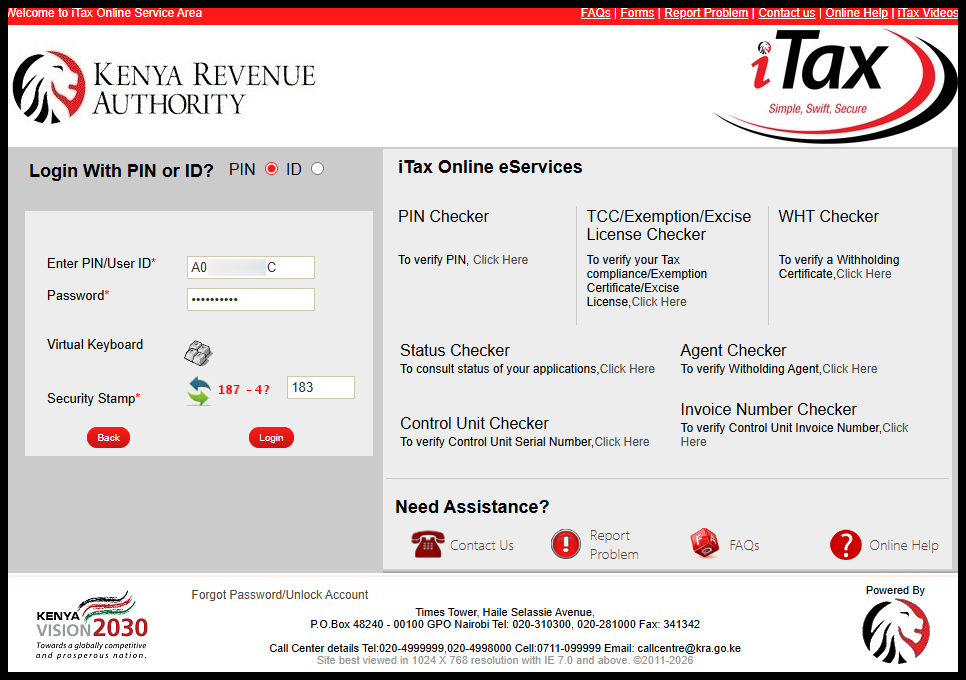
Step 3: Enter KRA Password and Solve Arithmetic Question (Security Stamp)
In this step, you will be required to enter your KRA Password and also solve the arithmetic question (security stamp). If you have forgotten your KRA Password, you can check our article on How To Reset KRA Password. A new password will be sent to your email and you can use it to login. Once you have entered your iTax Password, click on the “Login” button to access your KRA Portal Account.

Step 4: KRA Portal Account Dashboard
Once you have entered the correct KRA Password and solved the arithmetic question (security stamp) as illustrated in Step 3 above, you will be logged in successfully and be able to see and access your KRA Portal Account Dashboard.

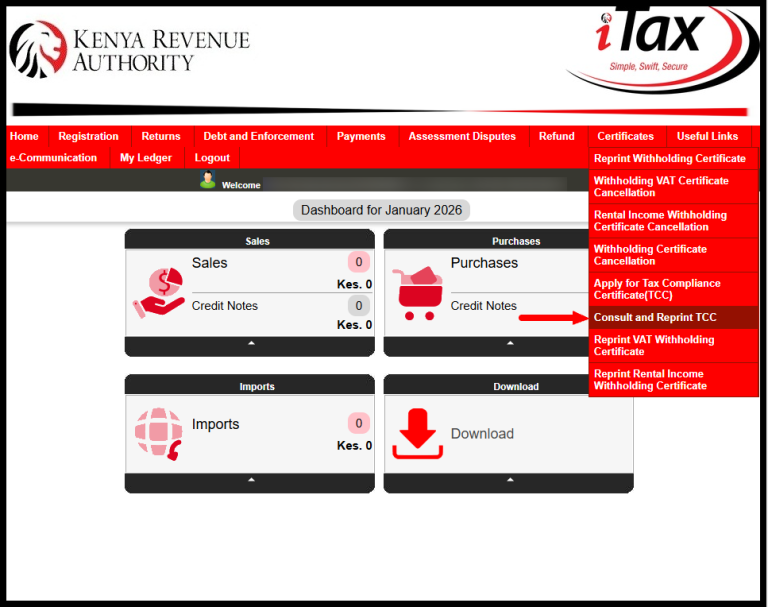
Step 5: Click On Certificates Then Consult And Reprint TCC
In this step, you will need to hover your mouse cursor towards the right hand side of the menu items list and click on the “Certificates” menu and from the drop down menu sub-list items click on “Consult and Reprint TCC”. This is the step where we need to download the Tax Compliance Certificate under the certificates menu on KRA Portal.

Step 6: Consult and Reprint Tax Compliance Certificate
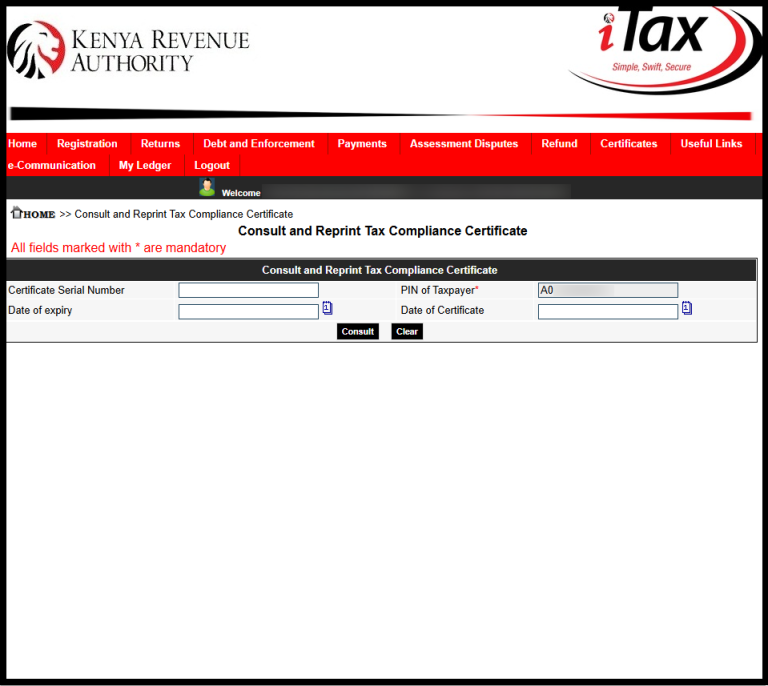
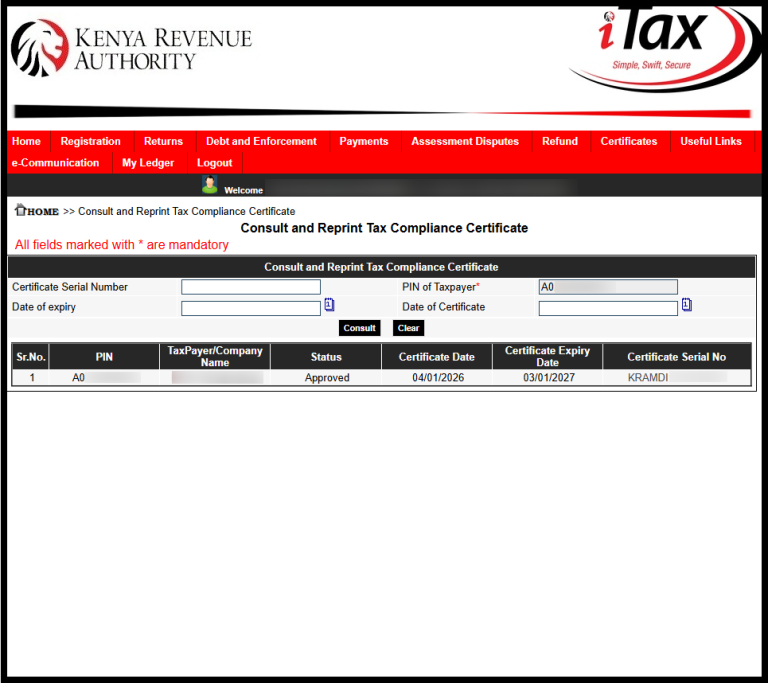
This is the step whereby you consult the KRA Compliance Database System using your KRA Portal Account for you to get a copy of your Tax Compliance Certificate. You will need to take note that all the fields marked with an asterisk (*) are mandatory.
Let me give you a tip, you do not need to fill in the “Tax Compliance Certificate Serial Number” field even though its mandatory. But if you have your Tax Compliance Certificate Serial Number, you can just fill it. But just leave the field blank, it will work fine.

You will click on the “Consult” button to proceed to the next step as shown in the screenshot above so as to be able to download the Tax Compliance Certificate on KRA Portal.
Step 7: Download Tax Compliance Certificate
In this last step, you will be able to download Tax Compliance Certificate by just clicking on the Tax Compliance Certificate Serial Number column. Here, you will note all the Tax Compliance Certificates that you has previously applied for will be displayed including their status either “Approved” or “Expired.” The screenshot below illustrates the same.

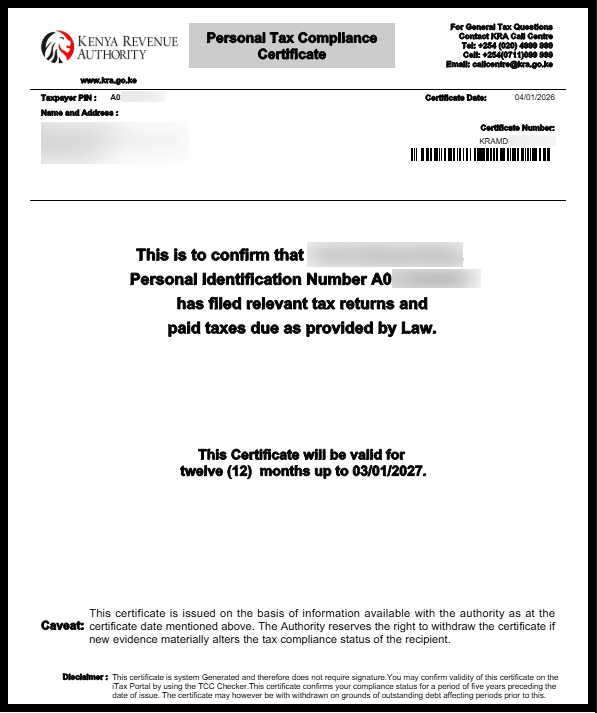
From the screenshot above, the current Tax Compliance Certificate will be in “Approved” status while your previous year Tax Compliance Certificate will be in “Expired” status. You can only Download current Tax Compliance Certificate form the KRA Portal. Below is a screenshot of a sample Tax Compliance Certificate.

READ ALSO: How To Check KRA Tax Obligation On KRA iTax Portal
A simple trick involved in downloading the Tax Compliance Certificate is by just clicking on the certificate serial number i.e KRAMSN**********21. This will download the PDF version of your Tax Compliance Certificate on KRA Portal and you will be able to save it and even print a copy of the same for use. So, next time you need to Download Tax Compliance Certificate on KRA Portal, just follow the 7 steps outlined above in this article.

Matthews Ohotto is a Writer at CYBER.CO.KE where he specializes in writing helpful and informative Step-by-Step Tutorials that empower Kenyans with practical skills and knowledge. He holds a Bachelor’s Degree in Business Information Technology (BBIT) from Jomo Kenyatta University of Agriculture and Technology (JKUAT). Get KRA Individual Services and KRA Returns Services in Kenya.
ADVERTISEMENT
Check Out Our Popular Blog Posts
Check Out Our KRA Individual Services
Register KRA PIN Number
Submit Service Request →Retrieve KRA PIN Certificate
Submit Service Request →Update KRA PIN Number
Submit Service Request →Change KRA PIN Email Address
Submit Service Request →Check Out Our KRA Returns Services
File KRA Nil Returns
Submit Service Request →File KRA Employment Returns
Submit Service Request →File KRA Amended Returns
Submit Service Request →File KRA Withholding Tax Returns
Submit Service Request →Check Out Our KRA Tax Calculators
Calculate Turnover Tax (TOT)
TOT Calculator →Calculate Monthly Rental Income (MRI)
MRI Calculator →Calculate Value Added Tax (VAT)
VAT Calculator →Calculate Pay As You Earn (PAYE)
PAYE Calculator →CYBER.CO.KE
Get KRA Services Online Today
CYBER.CO.KE is a trusted online cyber services website dedicated to providing KRA Individual Services and KRA Returns Services to customers in Kenya on a day to day basis.
The KRA Individual Services that we offer to customers includes: Registration of KRA PIN Number, Retrieval of KRA PIN Certificate, Updating of KRA PIN Number and Changing of KRA PIN Email Address.
The KRA Returns Services that we offer to customers includes: Filing of KRA Nil Returns, Filing of KRA Employment Returns, Filing of KRA Amended Returns and Filing of KRA Withholding Tax Returns.
If you are looking for dependable, fast and reliable KRA Services in Kenya, we are ready and available to support you at every step of the way.
We prioritize customer convenience, clear communication and prompt service delivery, making sure that your submitted service request is completed in the shortest time possible.
ADVERTISEMENT