
Disclaimer
CYBER.CO.KE is an independent Cyber Services website that offers KRA Services to customers in Kenya. We are not affiliated with any government agency, including Kenya Revenue Authority (KRA). As an independent Cyber Services website, we charge a service fee for the Professional Assistance provided to customers in Kenya.
The eCitizen Password serves as a crucial security feature and measure within the eCitizen platform, ensuring that only authorized individuals can access their respective eCitizen accounts. The primary objective of the password on eCitizen accounts is to safeguard the eCitizen account, with the exclusive responsibility for the password lying solely on the owner of the eCitizen account in Kenya.
READ ALSO: How To Apply For Certificate Of Good Conduct On eCitizen
In the event that you have forgotten or don’t know your eCitizen account password, the positive aspect is that you can swiftly and effortlessly reset it online using the password reset option on eCitizen. The process of resetting the password on eCitizen account enables you to establish and setup a new password for eCitizen account, granting you access to your eCitizen account and enabling requests for the diverse government services available on the platform.
To reset password on eCitizen account, start by navigating to the platform and clicking on “Sign in.” If you’ve forgotten your password, opt for “Forgot Password” and indicate your account type – either Email Address or ID Number. Input the eCitizen OTP Verification Code sent to your registered email or linked phone number. Once verified, proceed to establish a new password for your eCitizen account. This uncomplicated procedure ensures a secure and efficient method for regaining access to your eCitizen account while upholding essential security measures.
Requirements Needed In Resetting Password On eCitizen Account
To facilitate the process of resetting your forgotten eCitizen account password, it’s crucial to have four key prerequisites on hand. These requirements include the mobile number (phone number) registered with your eCitizen account and the email address associated with your eCitizen account. The following provides a concise overview of these two prerequisites and their relevance to the process of resetting your eCitizen account password online in Kenya.
Mobile Number (Phone Number) Linked To eCitizen Account
Resetting your eCitizen Password necessitates having the mobile number or phone number used during the creation or registration of the eCitizen account. This step is crucial because the mobile number or phone number associated with the eCitizen account is essential for receiving the eCitizen OTP (One Time Password). This OTP is sent to the specified mobile number (phone number), allowing you to use it to update your eCitizen Password to a new one.
Email Address Linked To eCitizen Account
Another prerequisite for resetting your eCitizen Password online is the Email Address linked to your eCitizen Account. This is crucial as you can also receive the eCitizen Password Reset code in your email address. However, it’s worth noting that the reset email might experience delays, making the use of the mobile number to obtain the OTP verification code a more preferable option.
How To Reset Password On eCitizen Account
The following are the 6 main steps involved in the process of How To Reset Password on eCitizen Account that you need to follow.
Step 1: Visit eCitizen
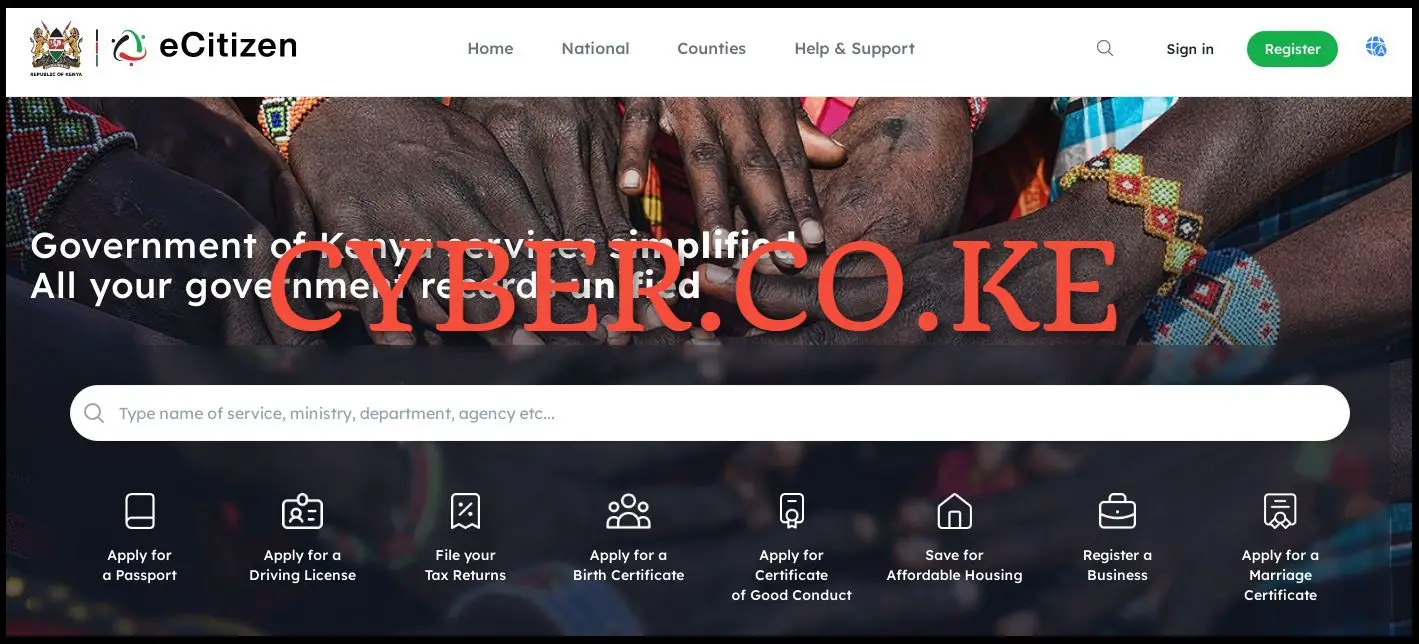
To be able to reset your forgotten eCitizen account password, you first need to visit eCitizen by using https://accounts.ecitizen.go.ke/en
Step 2: Click on Sign in
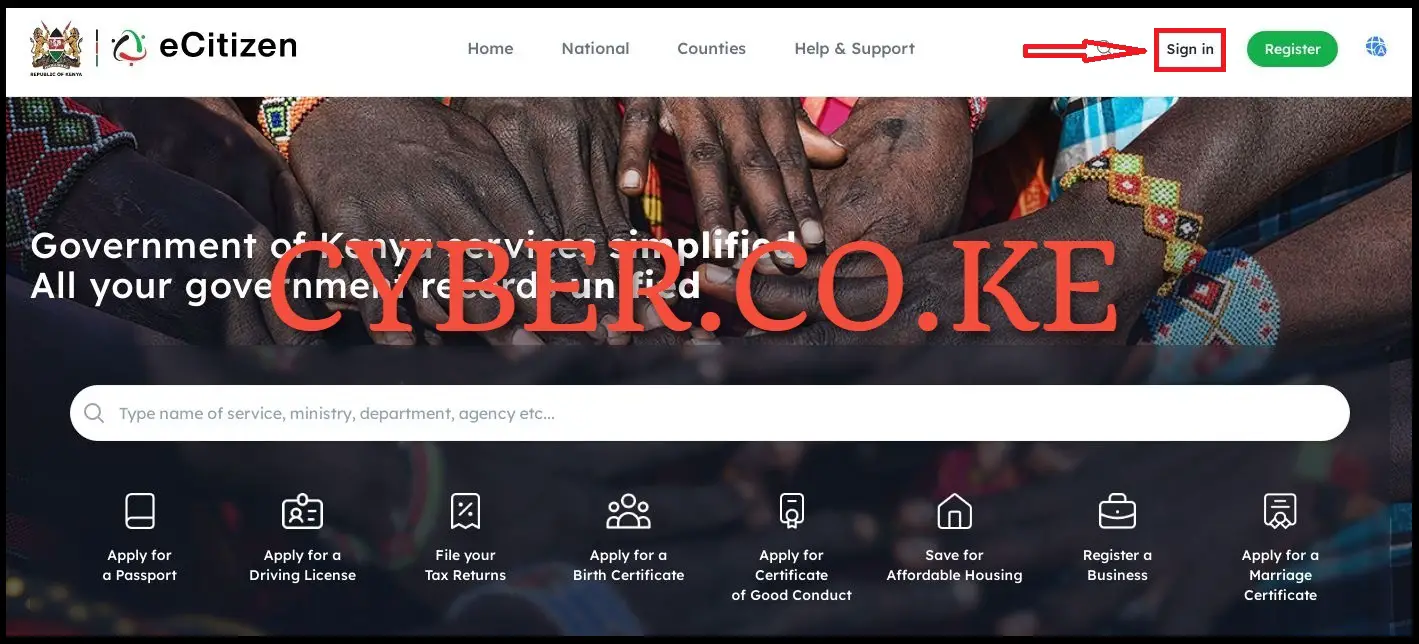
In this step, you need to click on the “Sign in” button which is located at the top right hand side of eCitizen homepage, to begin the process of How To Reset Password On eCitizen Account.
Step 3: Click on Forgot Password
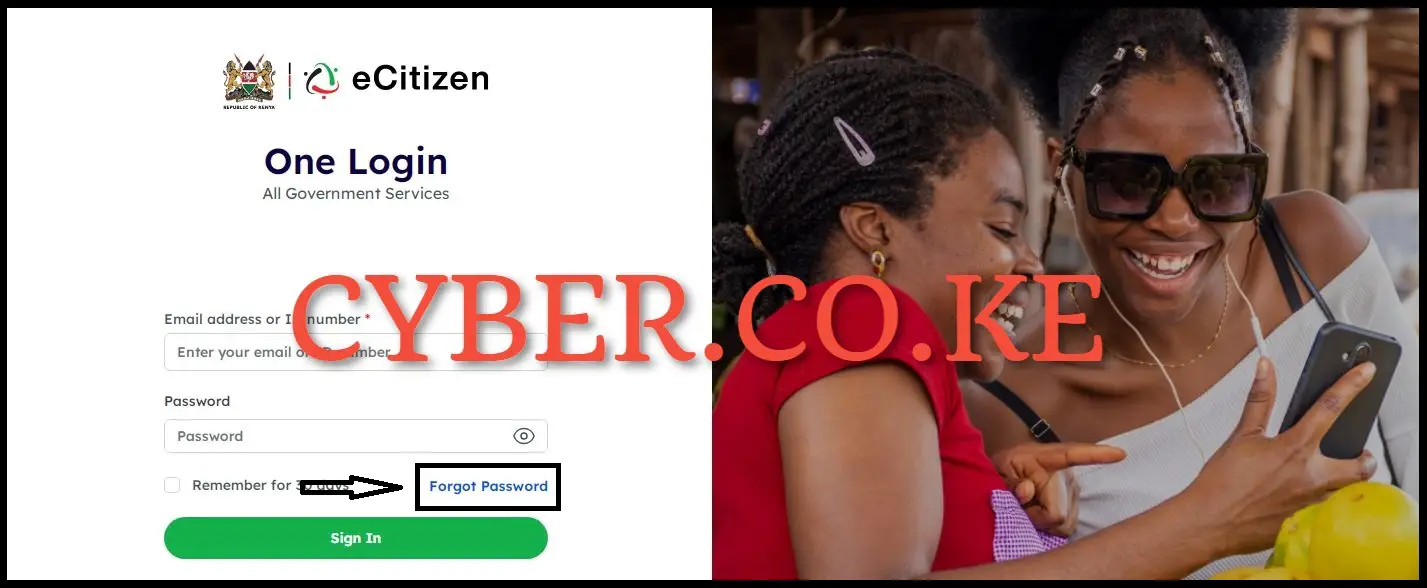
Upon reaching the eCitizen login page in this step, click on the “Forgot Password” link situated beneath the password input box on the right-hand side.
Step 4: Select Account Type and choose either Email Address or ID Number
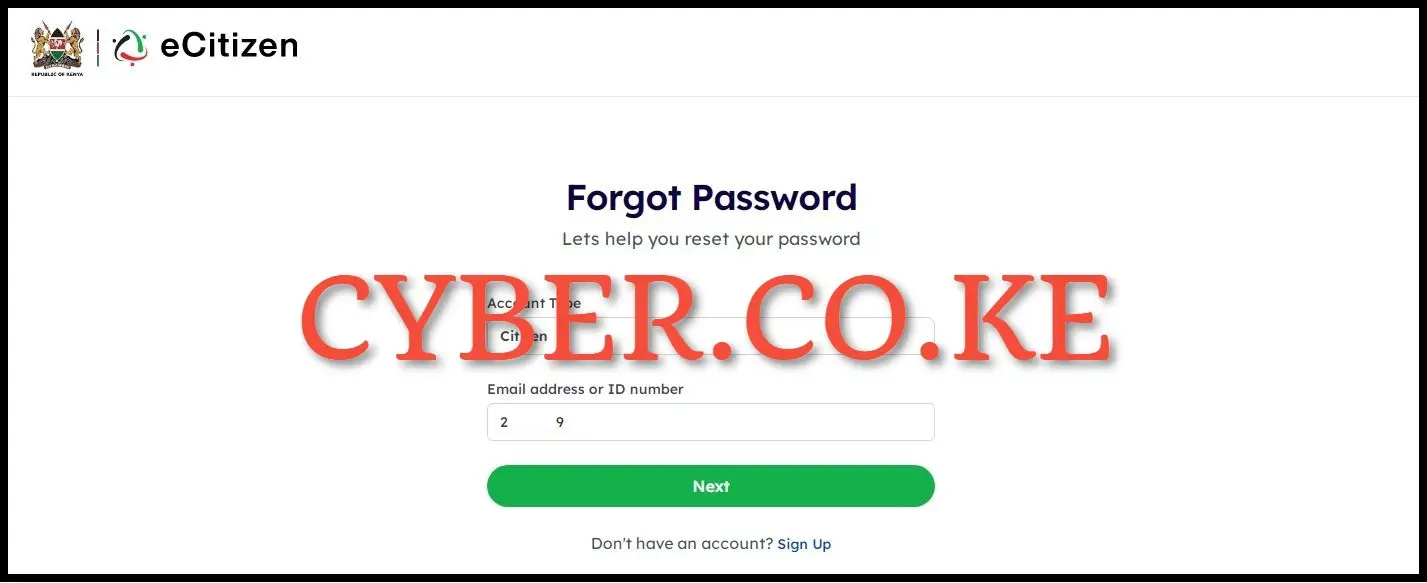
In this step, once you are on the page designed for resetting a forgotten or lost eCitizen Password, choose the account type – Citizen, Resident, Diplomat, or Foreigner (selecting “Resident” for a Kenyan). Then, opt for either Email Address or ID Number (preferring ID Number for a faster process). After making your selections, click the “Next” button.
Step 5: Enter eCitizen OTP Verification Code
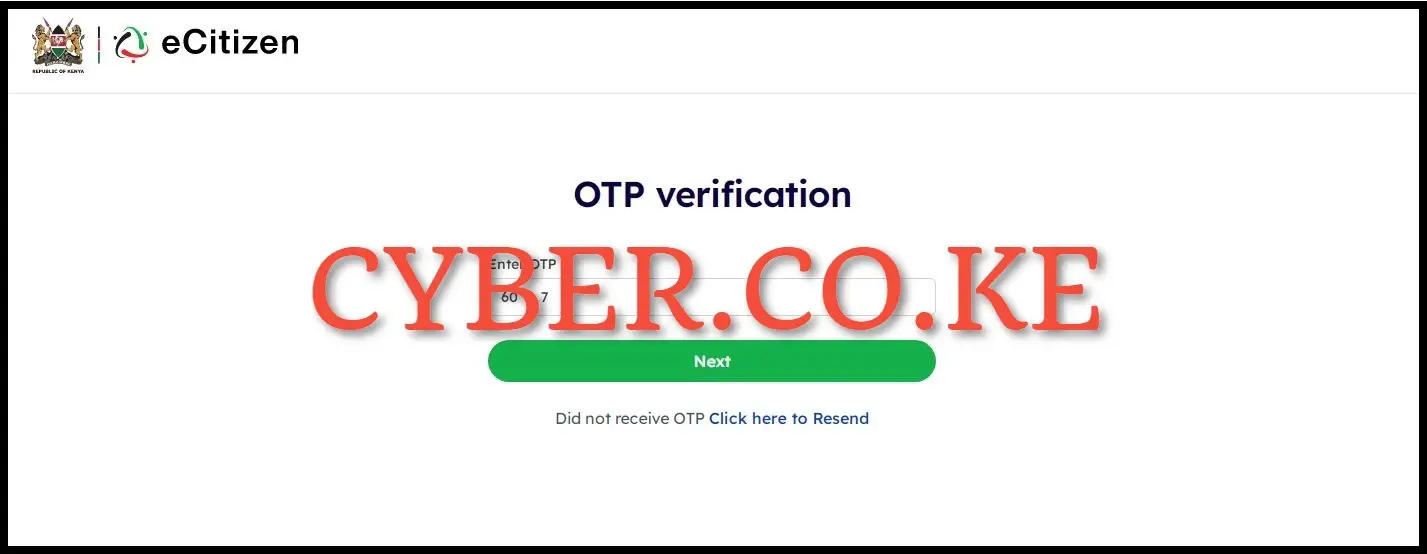
Subsequently, you need to input/enter the OTP Verification code sent by eCitizen to your mobile number (phone number), specifically the one linked to your eCitizen account. After entering the eCitizen OTP Verification Code, click on the “Next” button.
A pop-up message will appear, indicating that a “6-digit OTP has been sent to both your mobile number and email address.” Check your mobile number for the SMS containing the OTP code from eCitizen. Additionally, you can inspect your email address for the same code. Choose the option that suits you best.
Step 6: Setup New Password For eCitizen Account
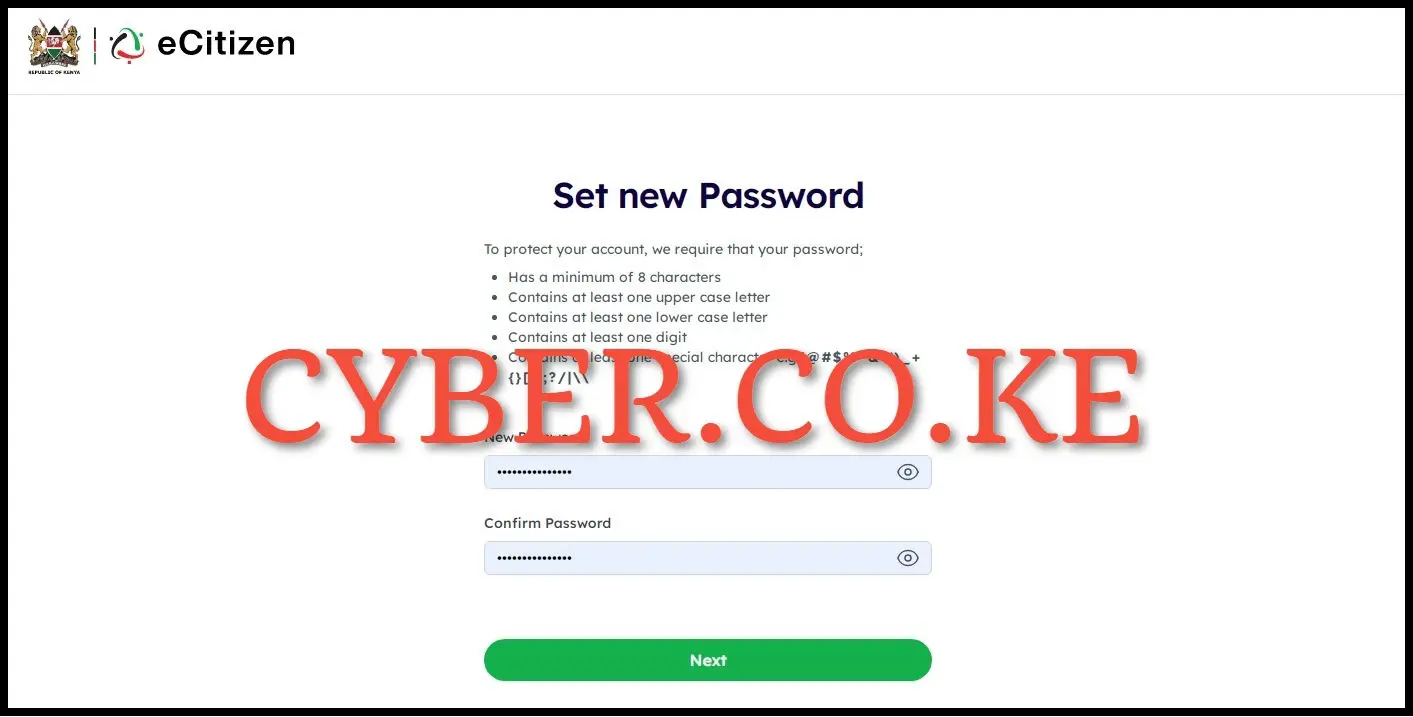
The final and and definitely the crucial step in the entire process of resetting the password on eCitizen account is to establish a new password for your eCitizen account online. It’s imperative to ensure that the new eCitizen password adheres to the strength and memorability guidelines specified by eCitizen.
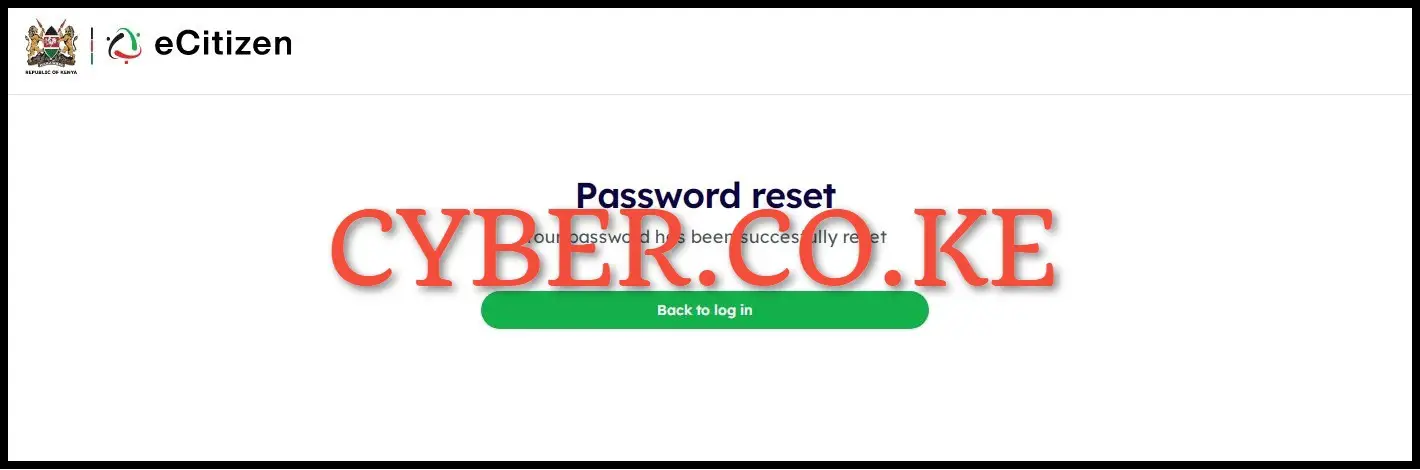
After setting up your new password for eCitizen account, click on the “Next” button. A notification will inform you that your password on eCitizen account has been successfully reset. You can now proceed to log in to your eCitizen account using both your ID Number and the newly chosen and setup eCitizen Account Password.
READ ALSO: How To Apply For Good Conduct Certificate On eCitizen
The aforementioned six main steps constitute a segment of the online password reset process on eCitizen account. To ensure the success of the password reset on eCitizen account, it is essential to have the required prerequisites and meticulously follow the step-by-step guidelines provided in this blog post. The outlined steps above will help you easily and quickly reset your password on eCitizen account.

Matthews Ohotto is a Writer at CYBER.CO.KE and a Creator at Cyber Services Kenya on YouTube. He specializes in writing helpful Blog Posts and creating informative Tutorial Videos that empower Kenyans with practical skills and knowledge. He holds a Bachelor’s Degree in Business Information Technology (BBIT) from Jomo Kenyatta University of Agriculture and Technology (JKUAT).